

Intuitive and User-Friendly Interface
Microsoft Designer boasts an intuitive and user-friendly interface. This makes it accessible to both beginners and experienced designers. The tool provides a clean and organized workspace. It allows you to focus on your design without distractions. Its user-friendly features include things like:- Drag-and-drop functionality
- Contextual menus
- Easy navigation
- Text prompts to start your design
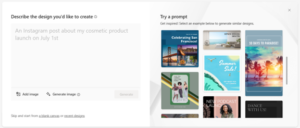
Microsoft Designer interface
Comprehensive Design Templates and Assets
Microsoft Designer has several stand-out features. One of them is its extensive collection of templates and assets. It has a wide range of professionally crafted templates. These enable you to kickstart your design projects quickly. Whether you need a business card, flyer, or social media post, this app has you covered. Additionally, the tool offers a vast library of assets. These include:- High-quality images
- Icons
- Fonts
- Color palettes
Smart Layout Suggestions and Design Recommendations
Microsoft Designer goes beyond being a mere design tool. It’s a knowledgeable design assistant. The tool employs artificial intelligence. It can analyze your design and provide smart layout suggestions and recommendations. So even if making images isn’t “your thing,” you can make something decent. The AI help is useful for those who may be new to design or seeking inspiration. Your “design assistant” can offer optimal font pairings, appropriate image placements, and more. Microsoft Designer helps you make informed design choices. This elevates the visual impact of your creations. It also keeps you from spending hours on one design.Seamless Collaboration and Integration
Collaboration is essential in today\'s digital workspace. Microsoft Designer understands this need. The tool offers seamless collaboration capabilities. It allows several users to work on the same design project simultaneously. You can easily share your designs with team members or clients. As well as get real-time feedback and edits. Furthermore, Microsoft Designer integrates seamlessly with other Microsoft Office applications. Such as PowerPoint and Word. This creates a cohesive workflow across different design and documentation tasks. The ability to collaborate ensures efficient teamwork. The integration with other tools enhances productivity.Accessibility and Cross-Platform Support
Microsoft Designer recognizes the importance of accessibility and cross-platform compatibility. The tool is available both as a web application and as a desktop application. You can use it on Windows and Mac. Use it working on your desktop computer or from a mobile device. The tool also adheres to accessibility standards. This means it’s inclusive and usable for individuals with diverse needs.What Does It Autogenerate?
Just for fun, let’s see what we get with the AI-generated option. We’ll describe our design as, “a sales ad for orange juice with palm trees.” In just a few seconds, this is what Microsoft Designer generated as options.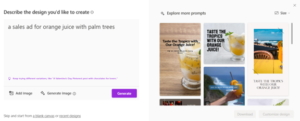 While some images might not be relevant, it gives many options that are. If you’re not getting what you want the first time, rephrase your prompt.
If you\'re seeking a user-friendly design tool, Microsoft Designer is worth exploring. Whether you\'re a seasoned designer or a beginner, it can save you time and money.
While some images might not be relevant, it gives many options that are. If you’re not getting what you want the first time, rephrase your prompt.
If you\'re seeking a user-friendly design tool, Microsoft Designer is worth exploring. Whether you\'re a seasoned designer or a beginner, it can save you time and money.